Imagine you’re browsing a local PH government website to check for announcements, apply for a government permit or a download document you need to fill up, but instead of the usual homepage, you’re greeted by a strange page with a techie text in dos mode, maybe it contain some political messages on the side, but most of the time it will have the hacker group’s logo.
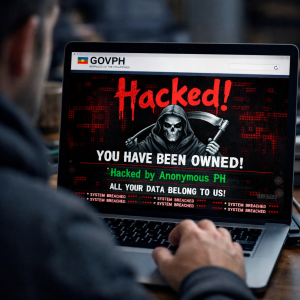
It’s alarming, but it happens more often than you might think. So what do you do?
- Mag-maritess at i-post ito sa personal social media accounts mo?
- I-report sa paborito mong news organization?
- Mang-hack back (if you have the tech skills, wynaut di ba?)?
- Dedma and do nothing?
- Other options, options, options?
In this article I provide you a friendly, step-by-step walk-through on handling website defacements of gov.ph sites, staying safe, and reporting it to the right contacts.
PH Government portals (.gov.ph) are magnets for hacktivist collectives and automated bot scanners looking for some easy pickings/low hanging fruits. But be warned: some incidents are not just the typical web defacements and it involves complex issues and actors (nation state that is).
The list of reasons why PH government websites are always compromised (defaced, hacked, infiltrated, etc.) are long, but I have listed some reasons and motivations below:
-
Unpatched software and vulnerabilities – Outdated CMS platforms, plugins, web servers, applications, and OS’es can contain exploitable vulnerabilities.
-
Weak passwords and authentication – Poor passwords, password reuse, lack of MFA, and exposed administrator accounts can enable unauthorized access.
-
Hacktivism – Groups or individuals may deface websites to publish political or social messages, protest government actions, or attract publicity.
-
Cybercrime and financial motives – Attackers may compromise government systems to steal information, deploy ransomware, commit fraud, or demand payment.
-
Geopolitical targeting — Philippine government and security organizations can become targets because of regional political and strategic interests.
QUICK SAFETY CHECK: PLAY IT SAFE!
- First thing first: Use privacy-focused web browsers and extensions. Brave Browser + Shields, Firefox + uBlock Origin and Chrome + uBlock Origin Lite are some privacy-focused browsers and extension combo (may be a good blog post for menardconnect.com in the future too)
- Avoid clicking links: The defaced page might hide malicious scripts or drive-by malware.
- Take clean snapshots: Take a full-screen snapshot (make sure your computer’s date and clock are visible) or save the page as a PDF so you have solid evidence.
- Do NOT try to ‘hack back’: I have stated my stance on hacking back here, so definite it’s a NO for me. Tempting as it might be to poke around or run vulnerability tools against the attacker (if you have the tech skills), I suggest that you stay on the safe side of Republic Act No. 10175 (Cybercrime Prevention Act).
Your Step-by-Step Game Plan
Here is how a clean, effective report flows from the moment you spot the defacement to getting the right teams involved:
| Step | Who Handles It? | What to Do |
| Step 1 | You / Observer | Take a full screenshot (with date/time), copy the exact URL, and save the webpage as a PDF. |
| Step 2 | Agency IT Team |
Notify the site’s IT admin or ISO. They’ll isolate the server and preserve background log files. NOTE: you can skip this step (and proceed to Step 3) if the site IT admin is unknown or unreachable. |
| Step 3 | DICT CERT-PH |
Send a formal email or fill out the CERT-PH portal report with all your gathered screenshots and digital evidence. Info they need: Target URL + Timestamp: Exact date, time + Incident details |
| Step 4 | Law Enforcement | For major security breaches or legal action, DICT works alongside the PNP Anti-Cybercrime Group and NBI. |
Reaching Out to DICT & CERT-PH
When you’re ready to submit your report, you can reach the National Computer Emergency Response Team (CERT-PH) under DICT through these channels:
- Email: cert-ph@dict.gov.ph or info@ncert.gov.ph
- Landline: (02) 8920-0101 local 1708
- Mobile / SMS Hotline: 0916-4894-613
- Online Portal: ncert.gov.ph/report-an-incident
Personally I have good experiences reporting incidents via CERT-PH email. My most recent report was the BIR defacement early this month
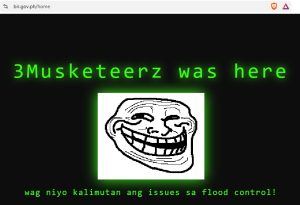
BIR Website Defacement on September 8, 2026
and the admin of the website have fixed the issue within 24 hours 🙂
At the end of the day, spotting a defaced government site can feel like breaking news, and it’s tempting to immediately post a screenshot on social media to alert everyone. But before hitting “share,” take a quick breath and think about the bigger picture. Spreading the word on social media platforms without alerting the right technical teams first gives attackers free publicity and can create unnecessary panic. Instead, channel that eagle-eye detection into action by filing a report directly with the agency’s IT team and DICT CERT-PH. By letting the pros quietly contain the issue and preserve vital evidence behind the scenes, you’re not just spotting a problem- you’re actively helping protect our digital community!
Keep safe y’all!